UGREEN - USB WiFi Adapter Usb Wireless Network Card Computer Wifi Receiver

Usb Wireless Network Card Computer Wifi Receiver
Product information:
Name: USB wireless network card
Model: CM448
Interface:USB
Chip type: RTL 8811CU
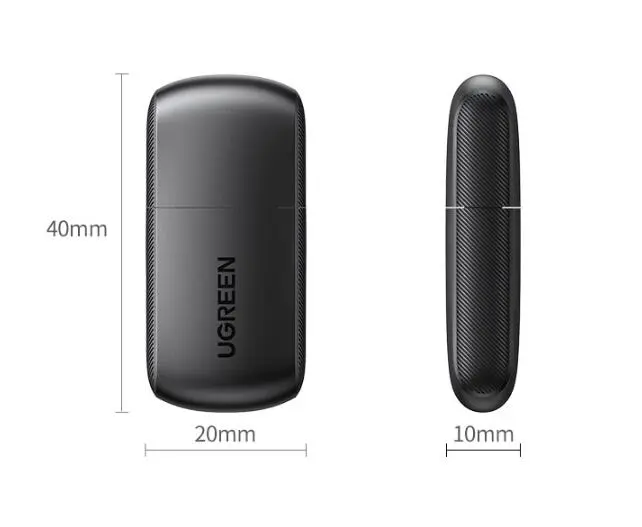
Package size: 92x92x15 mm
Product net weight: 5g
Weight with packaging: 30.5g
Specifications: 650M dual frequency
Packing list:
USB dual-band wireless network card*1
CD*1
Packing box*1
Warranty card*1
UGREEN - USB WiFi Adapter Multi-OS Support Driver Free for Win10
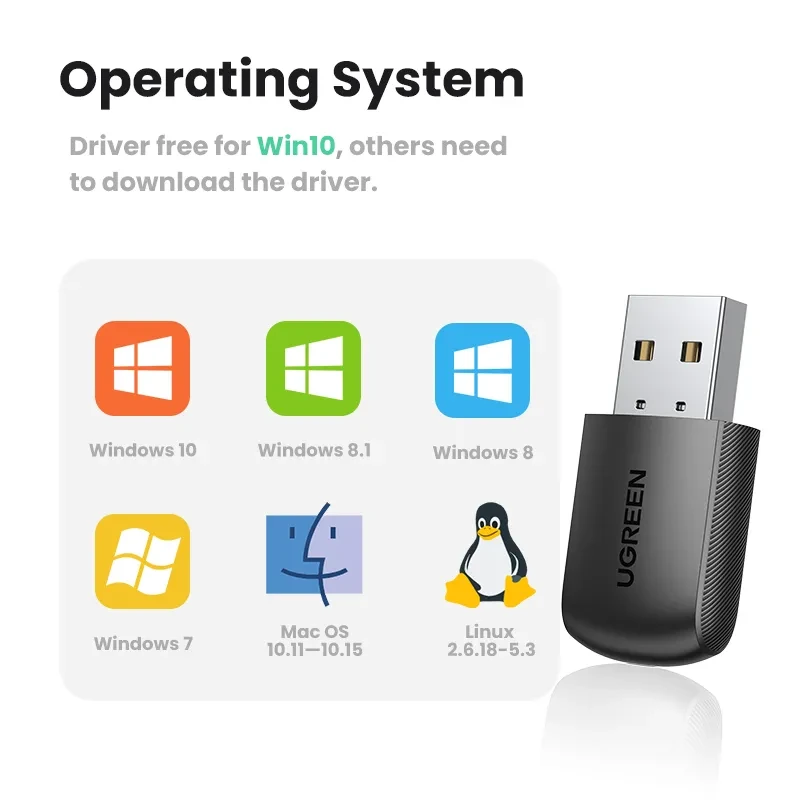
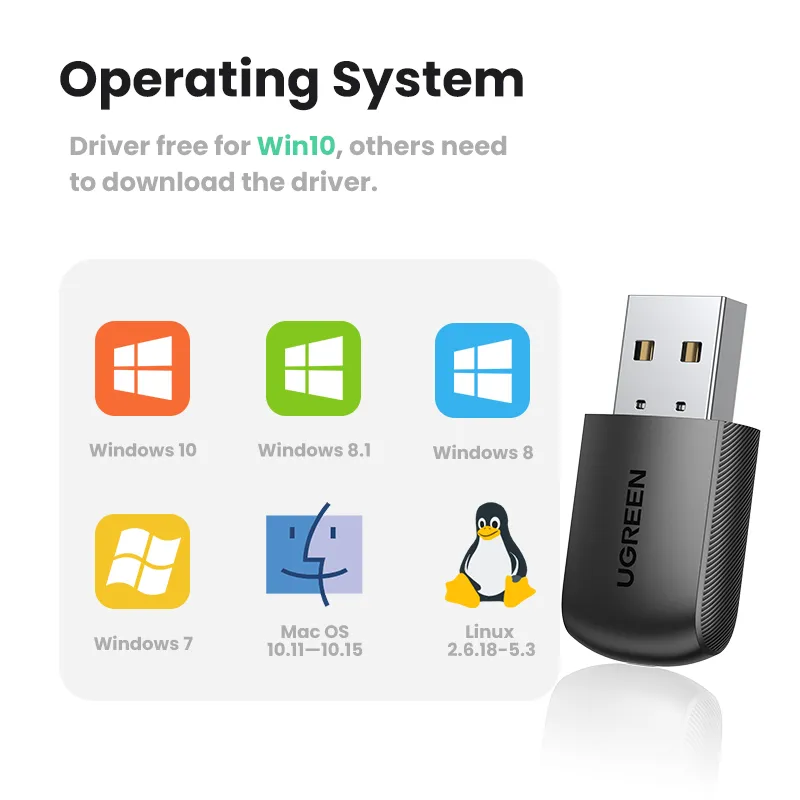
If you want a simple way to add wireless internet to a laptop or desktop, a compact USB WiFi adapter is one of the most practical upgrades you can buy. The UGREEN USB WiFi Adapter shown here is positioned for broad operating system support and everyday reliability, with a key convenience feature highlighted clearly: driver free for Windows 10, while other systems may require downloading the driver. That makes it an ideal choice for users who want fast setup on modern Windows machines, plus flexibility for older Windows versions, Mac systems, and Linux environments.
For many customers in New Zealand, the real-world need is straightforward: WiFi can be weak in certain rooms, desktop PCs may not have built-in wireless, or an older laptop may need a fresh network solution after an internal card fails. A USB WiFi adapter solves these problems without opening the device, without complicated installation steps, and without expensive upgrades. You plug it in, connect to your network, and you’re back online.
This particular UGREEN adapter is presented as compatible with:
- Windows 10 (driver free)
- Windows 8.1
- Windows 8
- Windows 7
- Mac OS 10.11–10.15
- Linux 2.6.18–5.3
That compatibility range makes it appealing for mixed-device households, offices with older PCs, and users who switch between Windows, Mac, and Linux for work or study.
What this UGREEN USB WiFi Adapter is designed for
A USB WiFi adapter is essentially a small external wireless network card. Instead of relying on a built-in WiFi chip inside your computer, the adapter provides wireless connectivity through a USB port.
Typical reasons people choose this UGREEN adapter include:
- Adding WiFi to a desktop PC that only has Ethernet
- Replacing unreliable built-in WiFi on a laptop that drops signal
- Improving connectivity for older systems that struggle with modern routers
- Creating a simple, portable WiFi solution you can move between devices
- Setting up a temporary workstation without doing internal hardware changes
- Supporting multiple operating systems for home labs, development rigs, or mixed environments
Key features customers care about most
Driver free for Windows 10
This is one of the biggest convenience points. “Driver free” typically means that on Windows 10, the operating system can recognise the adapter and install the required driver automatically.
What that means in practice:
- Plug in the adapter
- Wait for Windows 10 to detect it
- Connect to WiFi through the normal network menu
- No extra downloads for most Windows 10 setups
This is especially useful when you’re setting up a PC that has no internet connection yet. If Windows 10 can install the driver automatically, you don’t need a second computer to download anything.
Broad Windows support: Windows 7, 8, 8.1, 10
If you still use an older PC for specific software, printing, or legacy work tasks, having Windows 7–10 coverage adds flexibility. It also helps in shared offices where not every machine is running the latest version.
Mac OS support: 10.11 to 10.15
Many USB adapters do support macOS, but driver requirements vary widely. This product specifically mentions Mac OS 10.11–10.15, which is helpful if you’re running an older Mac system or a Mac used for specific workflows.
Linux support: kernel 2.6.18 to 5.3
Linux compatibility is a strong selling point for users running:
- Linux desktops
- Small servers
- Home lab PCs
- Development machines
- Embedded Linux systems (depending on driver availability and architecture)
The listed range suggests it’s intended to work across many older and newer kernel versions, which is useful if you maintain multiple Linux environments.
Who this is best for
Desktop users without built-in WiFi
Many desktop PCs don’t include wireless networking. If your router is not close enough for Ethernet, this UGREEN USB WiFi adapter offers a simple solution without needing to install an internal PCIe card.
Students and remote workers
If you rely on stable internet for classes, video calls, and cloud uploads, a dedicated USB adapter can be a practical fix when your device’s internal WiFi becomes inconsistent.
Older laptops needing a quick connectivity fix
When an internal wireless card becomes unreliable, a USB adapter can bring a laptop back to stable use without repair costs.
Mixed OS environments
If you run Windows on one machine, macOS on another, and Linux on a third, a single adapter family that lists compatibility can simplify purchasing decisions.
Travel setups and temporary workstations
A compact USB adapter is easy to pack and can be useful in temporary workspaces where you want a quick wireless option.
Setup guide
Windows 10 (driver free)
- Plug the UGREEN adapter into a USB port.
- Wait for Windows 10 to recognise the device (usually a few seconds).
- Click the WiFi/network icon in the taskbar.
- Select your WiFi network and enter the password.
- Confirm connection and test browsing.
Windows 7 / Windows 8 / Windows 8.1
Because the image states “others need to download the driver,” you should expect that older Windows versions may require a driver installation.
Practical approach:
- If your PC has internet via Ethernet, connect temporarily and download the driver package.
- If you do not have internet, use another computer to download the driver and transfer it via USB.
- Install the driver, restart if required, then plug in the adapter and connect to WiFi.
Mac OS 10.11–10.15
- Download and install the correct driver for your macOS version (as required).
- Reboot if requested.
- Plug in the adapter and open Network settings.
- Select the WiFi interface created by the adapter and connect to your network.
Linux 2.6.18–5.3
Linux setups vary widely. In many cases, compatibility depends on whether your distribution already includes the correct driver module or whether you need to install it.
Typical workflow:
- Plug in the adapter and check if it is detected
- Use network manager or command line tools to connect
- If not detected, install the required driver package or kernel module for your distribution
If you manage Linux systems, you likely already know the driver approach that matches your environment.
Practical performance expectations
Even without listing specific WiFi standards in the image, the core benefit of a USB WiFi adapter is usually not about chasing peak speeds on paper. It’s about improving day-to-day stability and making connectivity simple.
In real use, people typically notice improvements like:
- Fewer random disconnects
- More consistent signal reception compared to a failing internal card
- Better flexibility in placement (using a different USB port, a USB extension cable, or a front-panel port)
- Faster setup on devices that otherwise would require opening the case or swapping hardware
If your goal is stable browsing, video calling, streaming, and everyday work, this category of adapter is usually a strong solution.
Common use cases in home and office setups
Home office
- Stable WiFi connection for meetings and cloud tools
- Backup internet method if Ethernet is not available
- Easy move between work PC and home PC
Living room or media PC
- Add WiFi to a small desktop or mini PC connected to a TV
- Reduce the need for long Ethernet runs
Shared households
- A simple way to bring an older device back online
- Useful as a spare adapter when troubleshooting connectivity
Small business
- Quick connectivity fixes without waiting for hardware repair
- Helps keep older systems working reliably for admin tasks
Troubleshooting tips
If you want smoother setup and fewer surprises, these practical checks help:
- Try a different USB port, ideally a port directly on the computer rather than through a hub
- If you use a hub, use a powered hub to avoid unstable power delivery
- On Windows 7/8/8.1 and macOS, install the correct driver version for your operating system
- Restart after driver installation if the device does not appear immediately
- Keep your router firmware and network settings stable to avoid frequent disconnects
- If signal is weak, consider a short USB extension cable so the adapter can sit away from interference behind the PC case
Why choose UGREEN for a USB WiFi adapter
UGREEN is widely recognised for making practical connectivity accessories that focus on clean build quality and simple usability. For a USB WiFi adapter, customers typically care about:
- Consistent connection behaviour
- Hardware that doesn’t feel flimsy
- Clear OS compatibility
- Easy setup and straightforward everyday use
This product’s compatibility list and Windows 10 driver-free positioning align well with those buying priorities.
Summary
The UGREEN USB WiFi Adapter is a convenient wireless networking solution designed for both laptops and desktops, with broad operating system coverage across Windows, macOS, and Linux. The standout convenience feature is driver free for Windows 10, making it a plug-and-use option for most modern Windows users, while still offering support for older Windows versions and other operating systems through driver installation when required. If you want a compact, practical way to add or restore WiFi connectivity, this is a strong everyday choice for home, study, and office setups in New Zealand.
Meta Tag Description: UGREEN USB WiFi Adapter with multi OS support driver free for Windows 10 and compatible with Windows 7 8 8.1 Mac OS 10.11 to 10.15 and Linux 2.6.18 to 5.3 for easy wireless connectivity.
SEO Keywords: UGREEN USB WiFi adapter, UGREEN wireless network adapter, UGREEN USB wireless card, UGREEN WiFi adapter Windows 10, UGREEN WiFi adapter Mac OS, UGREEN WiFi adapter Linux, USB WiFi adapter for desktop, USB WiFi adapter for laptop
The product may be provided by a different brand of comparable quality.
The actual product may vary slightly from the image shown.
Shop amazing plants at The Node – a top destination for plant lovers
.png)







.jpg)









.jpg)





.jpeg)





.jpeg)



.jpeg)








.jpeg)



.jpeg)

.jpeg)

.jpeg)

.jpeg)




.jpeg)
.jpg)

.jpeg)






.jpeg)
.jpeg)




.jpeg)





.jpeg)


.jpeg)

.jpeg)

.jpeg)

.jpeg)







.jpeg)
.jpeg)
.jpeg)





.jpeg)



.jpeg)






.jpg)
.jpeg)









.jpg)


ulva-Logo.jpg)




.jpeg)



.png)















.png)