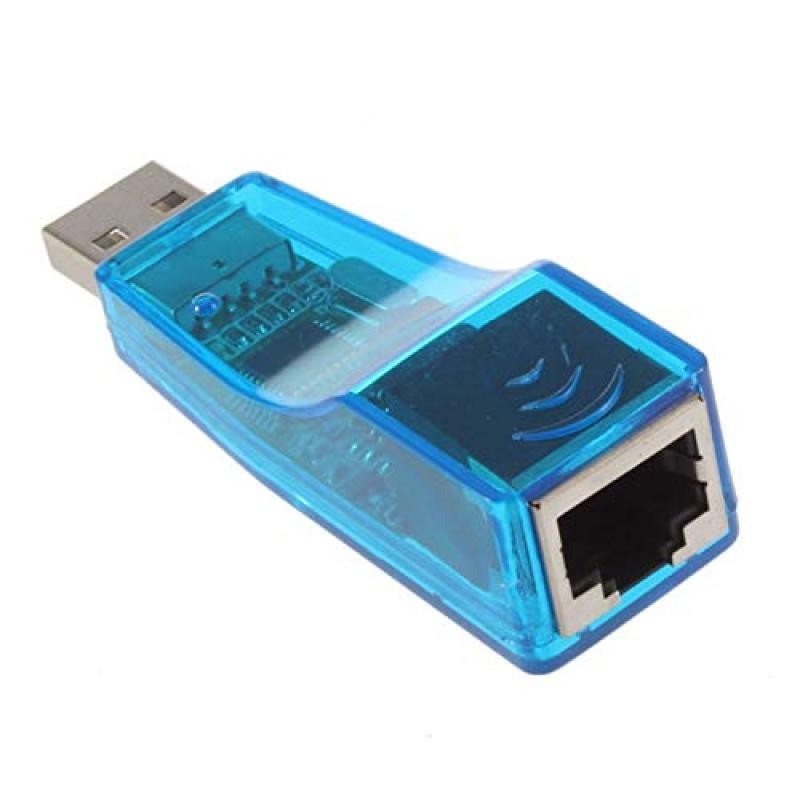
1.1USB network card RJ45 USB network card Notebook network card Desktop universal support VISAT

USB network card with driver CD. Install the driver for the first time!
No need to open the chassis installation, plug directly into the USB interface. Available on both desktop and laptop
Small size and easy to carry
10/100M network automatic identification
Plug and play, easy to install.
Support hot swap
It is equipped with an LED indicator for easy judgment of network status.
The following operating systems are supported: Win98/ME/2000/XP/VISTA/WIN7 Installation Notes:
1. The executable program that runs the folder on the CD: (Please see what model is written by the white bar code at the bottom of the network card, and choose which document to install.
2. Plug in the USB network card and install the driver automatically
1.1USB network card RJ45 USB network card Notebook network card Desktop universal support VISAT
When a laptop or desktop doesn’t have a reliable Ethernet port—or when Wi-Fi is slow, unstable, or blocked by distance—a USB to RJ45 network card is the simplest way to restore fast, steady wired internet. The 1.1USB network card RJ45 USB network card Notebook network card Desktop universal support VISAT is designed as a universal wired networking solution that plugs into a USB port and provides an RJ45 Ethernet connection for stable LAN access.
This type of adapter is commonly used for notebooks and desktops where you want smoother video calls, less buffering, lower gaming latency, and more consistent download/upload performance compared to wireless connections. It’s also a practical tool for offices, schools, and home setups where a wired line is required for security policies or network stability.
What this product is
This is a USB network card (also called a USB to Ethernet adapter) that converts a USB port into a standard RJ45 Ethernet port. It is positioned for:
- Notebook (laptop) network connectivity
- Desktop universal support
- RJ45 wired LAN access
- Plug-and-play style everyday use (depending on operating system support)
The “universal support” wording indicates it’s intended to work across common computer setups without requiring complex configuration for typical users.
Why you would use a USB RJ45 network card
1) Stable internet for work and study
If you do online meetings, remote work, cloud uploads, or online classes, wired Ethernet typically reduces:
- Video call dropouts
- Audio glitches
- Random Wi-Fi disconnections
- Lag during screen sharing
2) Faster, more consistent speeds than Wi-Fi (in many homes)
Even with a fast broadband plan, Wi-Fi can become the bottleneck—walls, distance, and interference all reduce real-world performance. A wired line usually delivers more consistent throughput.
3) Reliable gaming and streaming
For gaming, stability matters more than peak speed. Ethernet can reduce ping spikes and improve consistency. For streaming, wired helps keep 4K playback smoother.
4) Fix missing or broken Ethernet ports
Many modern laptops no longer include an Ethernet port. Some older PCs may have damaged ports or unreliable onboard network cards. A USB adapter is an easy workaround.
5) Useful for travel and business environments
In hotels, offices, or managed networks, Ethernet is often faster and sometimes required. A compact USB network card is a simple item to keep in your bag.
Key features and practical benefits
RJ45 Ethernet port support
RJ45 is the standard network connector used for wired LAN connections. This adapter allows your device to connect directly to:
- Routers
- Switches
- Wall network outlets
- Modems with Ethernet output
Notebook + desktop universal compatibility
Designed to work with both laptops and desktop computers—use it wherever you have a USB port and need wired internet.
USB 1.1 positioning
The product name references USB 1.1. In real-world terms, USB versions can influence the maximum speed an adapter can achieve. Many USB Ethernet adapters on the market are USB 2.0 or USB 3.0 for higher throughput, but USB 1.1 devices are typically used for basic connectivity rather than high-speed transfers.
Practical takeaway:
- Great for basic wired connectivity and stable access
-
If you need high-speed transfers, large file syncing, or gigabit-level performance, a higher USB standard adapter may be a better fit
(Your actual experience will also depend on the adapter chipset, your device, and your network hardware.)
Simple setup for everyday users
Most USB Ethernet adapters are straightforward:
- Plug into USB
- Connect an Ethernet cable to RJ45
- The computer recognises the device (driver support may vary)
- Connect to the network automatically (DHCP) or via your network settings
Compatibility and usage scenarios
This USB network card is typically used with:
- Laptops/notebooks without Ethernet ports
- Desktop PCs needing a quick wired network solution
- Thin clients / mini PCs where space is limited
- Office workstations requiring a stable wired link
- Backup network access when Wi-Fi is down
It works with standard Ethernet cables (commonly Cat5e/Cat6) and plugs into any standard RJ45 network port.
When this product is the right choice
Choose this adapter if you want:
- A simple way to add an Ethernet port via USB
- More stable internet for work, study, or streaming
- A universal adapter you can move between multiple computers
- A practical backup option for wired access when Wi-Fi isn’t reliable
When to consider a different model
You might consider a higher-spec adapter if:
- You need high-speed LAN transfers (NAS, large backups, media editing over network)
- Your internet plan is fast and you want to maximise throughput
- You specifically require 1 Gbps or higher performance
In those cases, look for USB 3.0 + Gigabit Ethernet adapters. But for basic connectivity and stability, this style can still do the job well.
How to use (quick steps)
- Plug the USB network card into your computer’s USB port
- Connect an Ethernet cable from your router/switch/wall outlet to the RJ45 port
- Wait a few seconds for the system to recognise it
- Check your network settings to confirm “Ethernet” is connected
- Use the internet as normal
If your computer doesn’t recognise it automatically, your operating system may request a driver installation.
Conclusion
The 1.1USB network card RJ45 USB network card Notebook network card Desktop universal support VISAT is a practical wired networking tool for adding an RJ45 Ethernet connection through USB. It’s ideal for notebooks and desktops that need more stable internet than Wi-Fi can provide, or for devices missing a built-in Ethernet port. If you want straightforward wired LAN access for everyday use, work, or as a backup connection option, this USB network card is a simple and useful addition to your setup.
Meta Tag Description: 1.1USB network card RJ45 USB network card Notebook network card Desktop universal support VISAT for adding wired Ethernet internet through USB on laptops and PCs.
SEO Keywords: USB network card RJ45 adapter, notebook USB to ethernet network card, desktop universal USB LAN adapter, USB 1.1 RJ45 network card, wired internet USB ethernet adapter, VISAT USB network card, USB LAN adapter for laptop, RJ45 USB network adapter
The product may be provided by a different brand of comparable quality.
The actual product may vary slightly from the image shown.
Shop amazing plants at The Node – a top destination for plant lovers
.png)










.jpg)









.jpg)





.jpeg)





.jpeg)



.jpeg)








.jpeg)



.jpeg)

.jpeg)

.jpeg)

.jpeg)




.jpeg)
.jpg)

.jpeg)






.jpeg)
.jpeg)




.jpeg)





.jpeg)


.jpeg)

.jpeg)

.jpeg)

.jpeg)







.jpeg)
.jpeg)
.jpeg)





.jpeg)



.jpeg)






.jpg)
.jpeg)









.jpg)


ulva-Logo.jpg)




.jpeg)



.png)















.png)